Have you ever watched a great YouTube video and thought it would make perfect content for LinkedIn?
Now there’s a way to transform any YouTube video into professional LinkedIn posts. You can also create newsletters like this one using a powerful AI automation built in N8N.
I recently built an automated system that takes YouTube videos and automatically creates LinkedIn content with eye-catching infographics.
This exact system helped me get almost 200,000 views on LinkedIn in just one month! I went from starting over with zero connections to building a large following quickly.
This process saves hours of work and helps business professionals grow their networks without burnout.
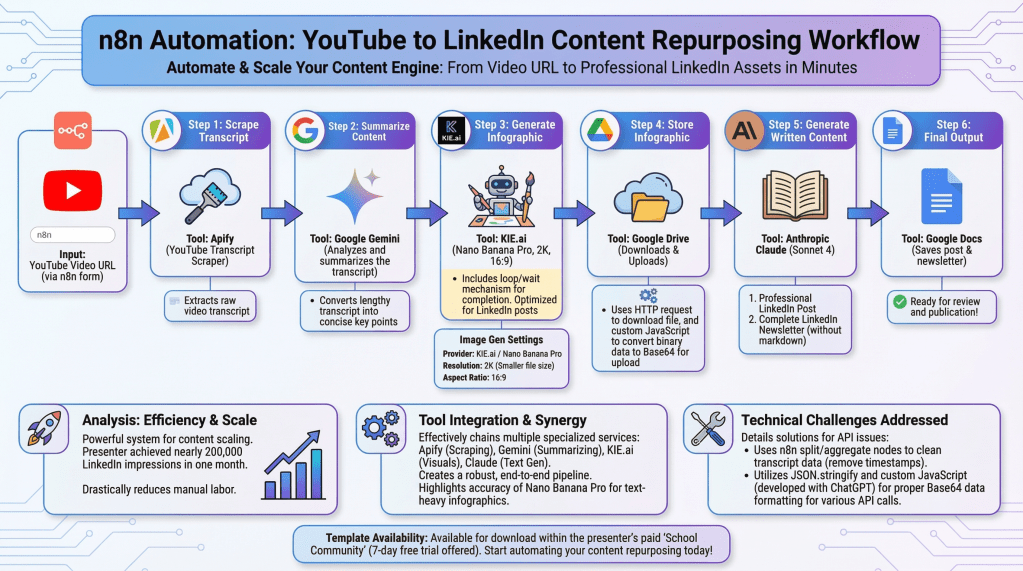
Here’s how it works (step-by-step):
- The system starts by taking a YouTube video link you provide within N8N.
2. It then pulls out the spoken words from that video using a transcript scraper. provided by Apify.
3. The system sends those written words to Google Gemini using the built-in API. It reads through everything and creates a short summary of the key takeaway points. It’s like having a smart assistant watch the video and tell you the key ideas in just a few sentences.
4. An AI platform called KIE takes that summary and creates a professional-looking infographic using NanoBanana Pro.
5. We feed the complete transcript into Claude Sonnet. We include a detailed prompt. This process helps create a professional LinkedIn post and newsletter.
The infographics look so good that they could have been made by a professional graphics designer.
This shows how automation can help busy professionals create more content without spending all their time writing and designing. Instead of taking hours to create one post, this automated N8N workflow does it in a few minutes.
The best part is that you can use videos from any YouTube channel, not just your own. This means you can transform industry experts’ videos into helpful content. This content establishes you as a thought leader in your field.
What types of YouTube videos do you think would work best for your LinkedIn?
Click here to join the growing AI community on Skool
Watch the full step-by-step tutorial on my YouTube channel & please subscribe!

Leave a comment