Ever wonder why some YouTube videos get millions of views while others get ignored?
The secret often lies in one simple thing: the thumbnail image. That small picture can make or break your video’s success.
The good news is you don’t need to hire a designer. You also don’t need to spend lots of money to create amazing, click-worthy thumbnails.
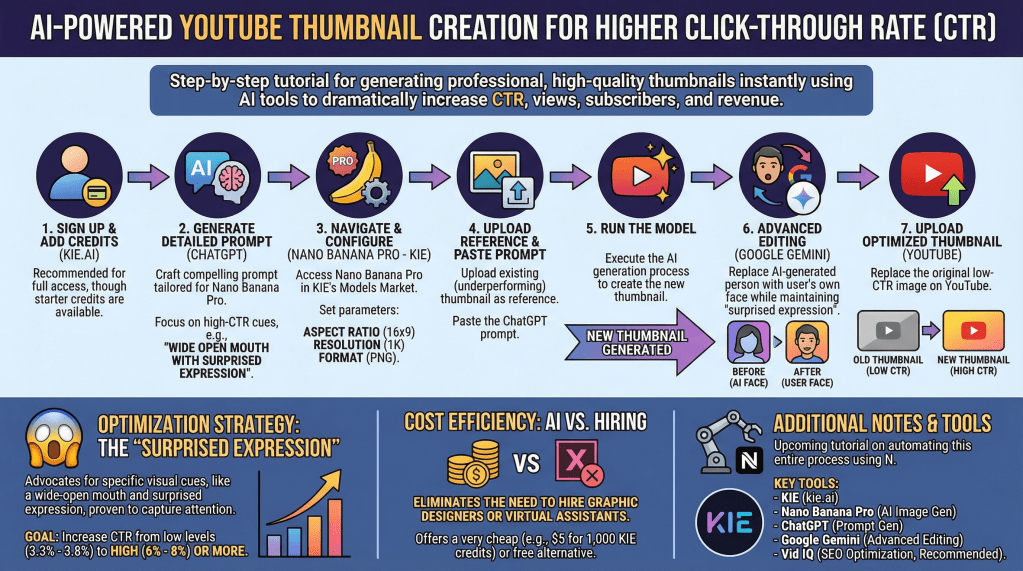
My latest tutorial shows exactly how to make professional YouTube thumbnails using freely available AI tools. The process uses Nano Banana Pro inside KIE. Think of it as having a smart assistant that creates eye-catching YouTube thumbnails for you.
Here’s how it works step-by-step:
First, you create a detailed prompt using ChatGPT. This prompt tells the AI exactly what kind of thumbnail you want. The key is asking for images that grab attention, like showing surprised expressions. These types of images get more clicks because they make people curious.
Next, you upload your current thumbnail to KIE and let Nano Banana Pro work its magic. The AI studies your image and creates a better version for uploading. It might add drop shadows to text, remove unwanted logos, or completely redesign the layout. The whole process takes less than a minute.
The results can be impressive. One creator showed how their click-through rate jumped from 3.8% to much higher numbers just by using better thumbnails.
For YouTube creators, this matters a lot. Higher click-through rates mean more views, more subscribers, and more revenue for your channel.
If the AI puts a random person in your thumbnail instead of you, there’s an easy fix. You can use Google Gemini to swap faces. Just upload the AI-created image and a photo of yourself. Then, ask it to replace the person while keeping the same expression.
The cost is very reasonable too. For about five dollars, you can create around 30-40 professional high-quality YouTube thumbnails.
That’s much cheaper than hiring a graphic designer for each video. Plus, you can make changes anytime without waiting for or paying someone else to do the work.
This approach works for any type of YouTube channel. Whether you create cooking videos, tech reviews, or business content, you will attract more viewers with better thumbnails. More people will find and watch your videos. The investment in good thumbnails pays off quickly through increased views and engagement.
Ready to try this yourself? The tools mentioned are easy to find and use, even for beginners.
Watch the step-by-step video below and join my free Skool community here.

Leave a comment