I put Claude Opus 5.5 through a real test: a design audit of my homepage. Anthropic says it performs at the level of Claude Fable 5.1 on most tasks and costs 40% less to run than Opus 5. I wanted to see what that looks like on a live site, not only on a benchmark chart.
In this review I go through the published benchmarks and pricing, show how I used Opus 5.5 in the Claude desktop app’s cloud sessions, and walk through the audit: what it found, what it cost, and the mistakes I nearly made.
Prefer to watch? See the full walkthrough on YouTube. I run the audit on screen.
Want the written version? Read the free AI Automation Station guide: Claude Opus vs Sonnet vs Haiku vs Fable: which to use.
What is Claude Opus 5.5?
Opus 5.5 is Anthropic’s new frontier model and the first in the Claude 5.5 family. Anthropic’s main claims:
- Fable 5.1-level performance on most work, at a fraction of the cost.
- 40% cheaper to run than Opus 5.
- About 30% faster output than Opus 5.
Claude Opus 5.5 benchmarks
Here are the published scores I went through in the video:
- Terminal-Bench 4.0: 66.4, about 11 points ahead of Fable 5.1 and far ahead of GPT 5.6 Soul.
- Frontier code: 54.4, ahead of Fable 5.1 and well ahead of Opus 5.
- CursorBench (agentic coding): 57.8, about 6 points ahead of Fable 5.1. This isn’t even Anthropic’s benchmark.
- GDPval (knowledge work): 1846. On business workflows it narrowly loses to GPT-6 Astra, which still leads.
- Humanity’s Last Exam: 67.7, ahead of the other models listed. GPT 5.6 Soul wasn’t included.
- Computer use: 81.8, ahead of Fable 5.1 at a fraction of the cost.
Score versus cost
The coding chart that compares score with cost is the most useful one. On high effort, Opus 5.5 scored about 64% compared with about 47% for Opus 5, and it cost about a third as much. On max effort, Opus 5 scored 52 at $15 while Opus 5.5 scored about 64 at $11. That’s 12 points higher on Terminal-Bench 4.0 for about $4 less.
Claude Opus 5.5 pricing
- Input: $4 per million tokens, down from $5 for Opus 5, a 20% saving.
- Output: $20 per million tokens, down from $25 for Opus 5.
Together with the efficiency gains, that’s how Anthropic gets to about 40% lower running costs overall.
The credits and limit reset I used
When I recorded this review in late September, Opus 5.5 was already in the desktop app. Two things on my account were useful for the test:
- $100 in Claude session credits as a gift. I claimed them, and they showed as included credits I could turn on at any time.
- A one-off limit reset that would bring my 5-hour and weekly limits back to full. My limits were resetting anyway in two days, so I saved it for the next time I ran out.
I used those session credits for the audit below. I could not confirm from official Anthropic sources that the promotional $100 credit is still available to claim. @ClaudeDevs announced it as a one-time cloud-session credit for existing Pro and Max subscribers, with a claim deadline of 7 October 2026. Check your own account rather than assuming the same gift is still on offer.
How to use Opus 5.5 in Claude cloud sessions
When I tried Claude Code in the browser, it told me to update Claude Code on the machine running the session before I could use the new model. The simpler route was the desktop app:
- Open the Claude desktop app.
- Start a new session.
- Choose Cloud instead of Local.
- Connect your repository. It pulls your project from GitHub.
- Select Opus 5.5 and give it a task.
Cloud sessions use session credits. That is how I spent the promotional $100 credit on this audit.
Real test: a homepage design audit
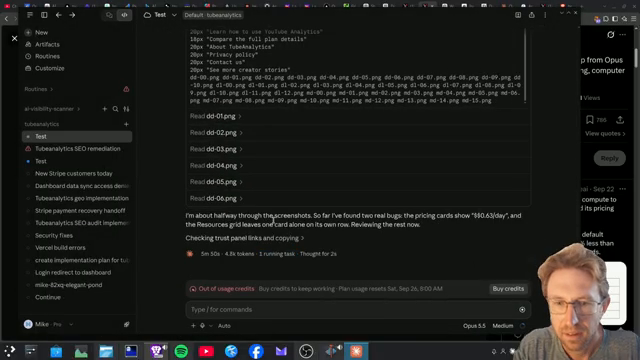
I asked Opus 5.5 to run a design audit of my homepage. It was fast. It took screenshots of the whole site as it went, and halfway through it had already found two bugs. One was the pricing cards showing two dollar signs, which I’d noticed myself and wanted fixed. I show this on screen in the video.
What the audit found
- Bugs: the duplicated dollar signs on the pricing cards, plus contrast issues.
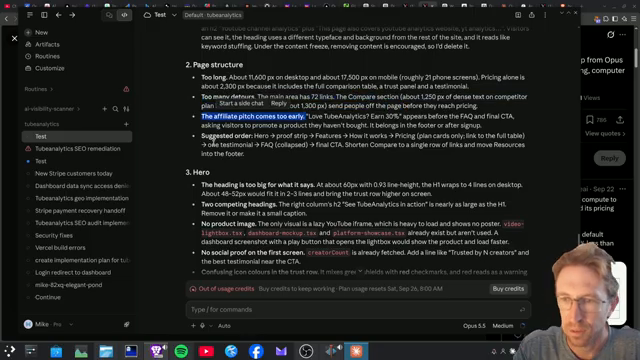
- Too many detours: the page wanders before getting to the point.
- Affiliate pitch too early: it suggested reordering the sections.
- Hero section: too big for what it says.
- Duplicate headings: two competing headings.
From audit to implementation plan
Instead of letting it start making changes, I asked for an implementation plan and switched to plan mode, which uses fewer credits. It used its writing skills to produce an audit implementation plan. I reviewed it, approved it in auto mode, and it started with the first PR covering bugs and contrast on a separate branch, ready to push to GitHub.
Cost so far: about $2 of the $100 credit during the audit, and about $5 by the time implementation had started.
Common mistakes to avoid
- Letting it implement straight away. Get an audit, then a plan, review it, and only then implement.
- Ignoring plan mode. Planning in plan mode saves credits.
- Using a limit reset too early. If you have one and your limits are about to reset anyway, keep it for later.
- Spending paid usage first. If your account has promotional session credits, use them before paying for extra usage.
- Fighting browser version errors. If the browser session asks for an update, use the desktop app’s cloud sessions.
- Assuming it wins every benchmark. GPT-6 Astra still narrowly leads on business workflows.
Want help building this for your own business?
The video shows what’s possible. Inside AI Income Lab, the paid community from AI Automation Station, you get step-by-step courses, reusable templates, and a place to ask questions while you build. The courses walk you through builds like this one step by step. Over 2,900 members are already building with it, from $29 a month, and you can cancel anytime.
FAQ
How much does Claude Opus 5.5 cost?
$4 per million input tokens and $20 per million output tokens, compared with $5 and $25 for Opus 5.
Is Opus 5.5 better than Fable 5.1?
Anthropic says it performs at Fable 5.1’s level on most tasks, and it scores higher on several coding benchmarks at a lower cost.
How did you use the session credits?
When I had promotional session credits, I opened the Claude desktop app, started a new session, chose Cloud instead of Local, and selected Opus 5.5.
How fast is Opus 5.5?
Anthropic says output is about 30% faster than Opus 5. In my design audit it felt very fast.
What did the design audit cost?
About $2 for the audit and about $5 once implementation had started, all from the free credits.
Conclusion
Claude Opus 5.5 is a big step up: near-Fable performance, strong coding scores, and lower prices than Opus 5. In a cloud session, using the promotional session credits I had at the time, it audited my homepage, found real bugs, and planned the fixes for a few dollars. For most coding and design work, it’s now the Claude model I’d start with.
If you’d rather not figure this out alone, AI Automation Station has a paid community for it: AI Income Lab. It’s where the courses, templates and help that go with these builds live, with 2,900+ members, from $29 a month, cancel anytime.

Leave a Reply