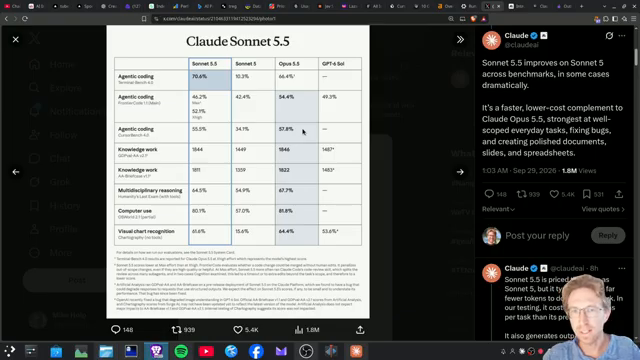
I went through Claude Sonnet 5.5’s published benchmarks and speed tests, then used it in the Claude desktop app. Anthropic says it is more than 30% faster than Sonnet 5 and costs up to 30% less for most work. On Terminal-Bench 4.0 it scores 70.6, just ahead of Opus 5.5, at half the token price.
In this review I cover the scores against Sonnet 5 and Opus 5.5, the pricing, the side-by-side speed tests, the cybersecurity safeguards, and the effort setting I now use for coding.
Prefer to watch? See the full walkthrough on YouTube. I go through the benchmarks and speed tests on screen.
What’s new in Claude Sonnet 5.5
- Faster: about 30% faster output than Sonnet 5.
- Cheaper in practice: the same token price as Sonnet 5, but it usually needs fewer tokens per task.
- Broad gains: coding, knowledge work, image understanding and long-horizon tasks.
- Clearer writing: Anthropic says that, like Opus 5.5, it writes more clearly than the previous generation.
It’s available in the Claude desktop app, where you can switch the model and effort level and start straight away. On high effort it got through my tasks very quickly.
Sonnet 5.5 benchmarks
Terminal-Bench 4.0 (agentic coding)
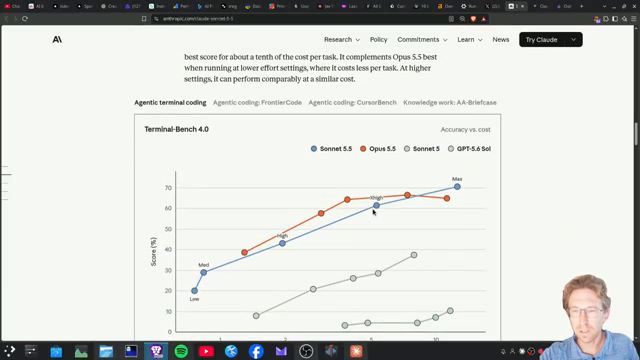
This is where Sonnet 5.5 stands out. It scores 70.6, up from about 10.3 for Sonnet 5, and just ahead of Opus 5.5. On max effort it costs about $12.54 per attempt, which is a little more than Opus 5.5, not a lot more.
Frontier code
Opus 5.5 still wins overall here. On max effort Sonnet 5.5 costs roughly three times as much as Opus 5.5 on this test, but on extra-high effort the two are about even, and Sonnet scores slightly higher for a bit less. On high effort Sonnet 5.5 scores about 10 points more than Sonnet 5 at about a fifth of the cost per task.
CursorBench and knowledge work
On CursorBench, which uses tasks from real Cursor coding sessions, Sonnet 5.5’s best score is within about two points of Opus 5.5 and about $4 cheaper on max effort. On GDPval knowledge work it’s about two points behind Opus 5.5, so close to a tie.
Computer use and chart reading
It’s within about a point of Opus 5.5 on computer use and nearly 30 points ahead of Sonnet 5. On chart recognition it’s close to 50 points ahead of Sonnet 5, and it clearly beats GPT 5.6 Soul on these tests.
Sonnet 5.5 vs Sonnet 5 at a glance
- Terminal-Bench 4.0: about 70.6, up from about 10.3.
- Frontier code on high effort: about 10 points higher, at about a fifth of the cost per task.
- Computer use: nearly 30 points higher.
- Chart recognition: close to 50 points higher.
- Price per token: unchanged at $2 input and $10 output per million.
- Tokens per task: fewer, about 13,000 compared with 21,000 in the sand dune demo.
If you’re on Sonnet 5 today, there’s no reason to stay. You pay the same per token and get better results for less total spend.
How to switch to Sonnet 5.5
- In the Claude desktop app, open the model picker and choose Sonnet 5.5.
- Set effort to high for coding.
- In Claude Code, switch models and raise effort above the medium default.
Pricing: Sonnet 5.5 vs Opus 5.5
- Input: $2 per million tokens for Sonnet 5.5, compared with $4 for Opus 5.5.
- Output: $10 per million tokens, compared with $20 for Opus 5.5.
- Cache reads: $0.10 per million tokens. Anthropic halved this after the Sonnet 5.5 launch. The $0.20 figure was the original launch price.
That’s half the price of Opus 5.5 on both input and output, and Sonnet 5.5 also tends to use fewer tokens. If you want work done more cheaply and often faster, Sonnet 5.5 is the one I’d pick.
Speed tests
Anthropic published two side-by-side demos. I show this on screen in the video.
- Sand dune game in one HTML file: the token writing speed looks about the same, but Sonnet 5.5 finished the game while Sonnet 5 was still working. It used about 13,000 tokens compared with about 21,000 for Sonnet 5.
- A murmuration of 400 starlings: Sonnet 5.5 got going noticeably sooner than Sonnet 5.
Most of the speed gain comes from doing the same job in fewer tokens.
Effort levels: why I’m moving off medium
In Claude Code and the Claude apps the default effort is medium, while the Claude platform defaults to high. I usually use medium, but the coding charts show Sonnet 5.5 scoring much higher on high, extra-high and max than on low or medium. Since I mostly use it for coding, I’ve switched to high. For heavy coding, use high or extra-high.
Cybersecurity safeguards
Anthropic says Sonnet 5.5’s cyber capabilities are a big step up from Sonnet 5. You can still find and fix bugs as part of normal software development, but higher-risk cybersecurity tasks visibly fall back to Sonnet 5. If you do serious security work, expect that fallback.
When to use Sonnet 5.5
Anthropic recommends Sonnet 5.5 for well-scoped bug fixes, frequent coding turns, first drafts, documents and slides, and high-volume workflows. I’d keep Opus 5.5 for the hardest tasks, where it still leads on frontier code.
Common mistakes to avoid
- Leaving effort on medium for coding. High or extra-high gives much better coding results.
- Defaulting to Opus for everything. Sonnet 5.5 costs half as much and matches it on many tests.
- Judging cost only by token price. Fewer tokens per task is where much of the saving comes from.
- Expecting full cyber capability. Higher-risk security work falls back to Sonnet 5.
- Using max everywhere. On some tests max costs much more for a small gain. Extra-high is often the better value.
Want help building this for your own business?
The video shows what’s possible. Inside AI Income Lab, the paid community from AI Automation Station, you get step-by-step courses, reusable templates, and a place to ask questions while you build. The courses walk you through builds like this one step by step. Over 2,900 members are already building with it, from $29 a month, and you can cancel anytime.
FAQ
How much does Claude Sonnet 5.5 cost?
$2 per million input tokens and $10 per million output tokens, the same as Sonnet 5. Cache reads are $0.10 per million tokens after Anthropic halved that price following the Sonnet 5.5 launch.
Is Sonnet 5.5 better than Opus 5.5?
It slightly beats Opus 5.5 on Terminal-Bench 4.0 and is close on CursorBench, GDPval and computer use. Opus 5.5 still leads on frontier code.
How much faster is Sonnet 5.5?
Output is about 30% faster than Sonnet 5, and it often needs fewer tokens to finish.
What effort level should I use?
For coding I recommend high or extra-high. Claude Code defaults to medium.
Why did my security task use Sonnet 5?
Higher-risk cybersecurity tasks automatically fall back to Sonnet 5 as a safeguard.
Conclusion
Claude Sonnet 5.5 gives you close to Opus 5.5 performance at half the price, with faster output and fewer tokens per task. Set effort to high for coding, keep Opus for the hardest work, and use Sonnet 5.5 for most everyday coding and writing.
If you’d rather not figure this out alone, AI Automation Station has a paid community for it: AI Income Lab. It’s where the courses, templates and help that go with these builds live, with 2,900+ members, from $29 a month, cancel anytime.

Leave a Reply