OpenDesign is a free, open-source design workspace that plugs into the AI coding agents you may already use, such as Claude Code, Codex and OpenCode. It turns a written prompt into a working HTML design: a slide deck, a short motion piece, a landing page or a full design system. In this guide I walk through how I installed it on Linux, connected a model, and used it to build a slide deck for one of my YouTube videos.
Some links in this post are affiliate links, which means I may earn a commission at no extra cost to you.
Prefer to watch? See the full walkthrough on YouTube. I install it on Linux and turn a YouTube video into a slide deck on screen.
Want the written version? Read the free AI Automation Station guide: OpenDesign (Open Design) on Linux: Source Setup and Slides.
What OpenDesign is and who it suits
OpenDesign calls itself a collaborative design agent workspace. You describe what you want, pick a design system, and an AI agent writes the result as HTML files inside a project. You can preview the result, edit text, color and spacing directly, export it, or open the project in an editor like Cursor or VS Code.
It is pitched as an open-source alternative to Claude Design. The project is released under the Apache-2.0 license, and its site listed more than 100,000 GitHub stars when I checked on October 31, 2026. For a freelancer or consultant, the appeal is simple. You get presentation-ready visuals for client calls, proposals and videos without paying for a separate design tool or learning a new editor.
There are three ways to run it, according to the OpenDesign site:
- Local CLI. OpenDesign drives a coding agent already installed and signed in on your computer, such as Claude Code or Codex. That agent’s own subscription or API usage still applies.
- Bring your own key. You add an API key from a model provider, and that provider bills you directly. No OpenDesign credits are used.
- Hosted. You sign in to OpenDesign Cloud and use its hosted models, which draw on your plan’s credits.
The desktop app is free to use with a local agent or your own key. Paid plans add hosted model credits. When I checked the pricing page on October 31, 2026, the entry paid plan (Go) was listed at $10 a month, with a first-month discount and a lower yearly rate. I checked again on 12 November 2026, and Go was still $10 a month, with the first month at $8 and the yearly rate at $84. In the video I mention it goes up to about $8 a month, which matches that discounted first month. Prices and promotions change, so check the OpenDesign pricing page before you sign up.
How to install OpenDesign and build your first design
1. Download the app, or build it from source on Linux
On macOS and Windows you can download the desktop app from open-design.ai. I’m on Linux, which had no download when I recorded, so I pulled the source code from the project’s GitHub repository and ran it on localhost instead. If you go this route, read the repository’s README for the current build commands, because they change between releases.
2. Fix missing Node modules and Corepack
My first launch failed with a message that package.json existed but the node modules were missing. Running an install in the project folder fixed that:
npm installThe next error said Corepack was not found. Corepack is the Node.js tool that manages package managers like pnpm and Yarn. I installed it with Homebrew, which worked on my Linux machine:
brew install corepackIf you don’t use Homebrew, npm install -g corepack is the usual alternative. After that the app started. I ran all of this inside Herdr, a terminal tool for running several coding agents in one place, which keeps the session saved between runs. It isn’t required, and any terminal will do.
3. Sign in and choose a folder
Once OpenDesign loads, you can sign up or sign in. I signed in with a Google account, approved the login, and landed in the workspace. From there you can choose a project folder and browse the sample prompts, including motion design for short animated pieces.
4. Pick your model and add API keys
The workspace lets you choose which model or coding agent does the work. My account showed about 50 cents of starter credit, and I could pick hosted models such as DeepSeek V4.1 Flash. To use models from OpenAI, Anthropic or Google Gemini directly, you enter your own API key in the settings. I show where these settings sit on screen in the video, which is quicker than describing every menu.
5. Generate a test piece
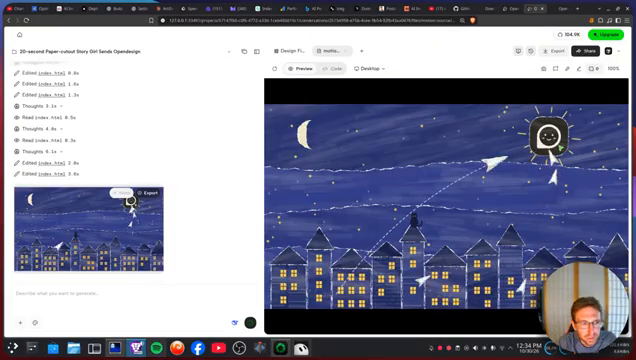
For a first test I asked for a 20-second paper cutout story. While it ran I opened the plan and balance page and watched the credits tick down. It had used about one cent at that point. The output is an HTML file you can preview right away, and you can view the code behind it. It came out better than I expected, and it took about a minute.
6. Build a design system
A design system holds your colors, type, spacing and components, so every slide or page follows the same look. OpenDesign offers more than 150 open-source design systems, per its site, and you can create your own from a website, a GitHub repository or a Figma file. If you make content for clients or a channel, set this up early. It saves you from fixing fonts and colors on every new piece.
Turning a YouTube video into a slide deck
This was the part I cared about most. I wanted a deck to show during my next video about getting AI consulting work, using an AI agent inside GrokBot to find leads and send email pitches. I wrote a short prompt describing the deck and added a link to a YouTube video on the topic as a reference.
OpenDesign pulled the information from that video and built a complete deck in my own design in about three to four minutes. I could scroll through every slide in the preview, then export it as a standalone HTML file and open it in its own browser tab to present. The whole session cost me roughly 16 cents of credit.
A few practical uses for this kind of deck:
- Visuals to show on screen while you explain a topic in a video or webinar.
- A short pitch deck for a discovery call with a prospective client.
- A one-page summary of a long training video for your team.
- A first draft of a proposal layout you then refine by hand.
Sharing and exporting your work
After generation you have several options. You can export to HTML, share the project, or open it in an editor such as Cursor, VS Code or Antigravity. The site also lists PDF and PNG export, share links, and a team workspace where colleagues can leave comments on the design for the agent to act on. Because the output is plain HTML, you can host it anywhere or hand it to a developer.
Common mistakes to avoid
- Expecting a Linux installer. When I recorded there was only a macOS and Windows download. On Linux, plan to build from source.
- Skipping the dependency errors. Missing node modules and Corepack are easy fixes, but the app won’t start until you deal with them.
- Forgetting who bills you. Hosted models use OpenDesign credits, your own key bills your provider, and a local agent uses that agent’s plan. Know which one you picked before a long job.
- Leaving out a reference. The deck came out far more specific when I gave it a source video to work from.
- Not checking facts in the output. AI-built slides can restate figures confidently. Review every number before you present it to a client.
Want help building this for your own business?
The video shows what’s possible. Inside AI Income Lab, the paid community from AI Automation Station, you get step-by-step courses, reusable templates, and a place to ask questions while you build. The courses walk you through builds like this one step by step. Over 2,900 members are already building with it, from $29 a month, and you can cancel anytime.
FAQ
Is OpenDesign free?
The desktop app is free to use with a local coding agent or your own API key. Paid plans add hosted model credits. Check the current pricing page, as plans and promotions change.
Does OpenDesign work on Linux?
When I recorded, the download was for macOS and Windows only. I ran it on Linux by building it from the source code on GitHub.
Which AI agents and models can I use?
The site lists Claude Code, Codex, Cursor, OpenCode, Gemini and many others. You can also connect your own API keys for providers such as OpenAI, Anthropic and Google Gemini, or use OpenDesign’s hosted models.
What does OpenDesign produce?
It creates HTML files: slide decks, motion pieces, websites, app screens, dashboards and graphics. You can preview, edit, export to HTML, or open the project in a code editor.
How much did your tests cost?
On hosted credits, my 20-second test piece had used about one cent while it ran, and the whole session including the full slide deck came to roughly 16 cents. Your costs depend on the model and the size of the job.
Conclusion
OpenDesign is a practical way to get clean visuals out of the AI agents you already pay for, or out of cheap hosted models if you don’t. Install it, connect a model, set up a design system, and try one real job, such as a deck for your next client call or video. That single test will tell you quickly whether it fits your workflow.
If you’d rather not figure this out alone, AI Automation Station has a paid community for it: AI Income Lab. It’s where the courses, templates and help that go with these builds live, with 2,900+ members, from $29 a month, cancel anytime.

Leave a Reply