Jev is a specialized AI model from TypeSafe AI. It doesn’t write text. It makes fast, cheap, structured decisions for your software and agents. You give it some information and a typed question, and it returns an answer with probabilities. In this guide I’ll explain what Jev is, where it fits next to a normal LLM, and how I set it up in Claude Code and Codex to run parts of my SEO workflow.
Prefer to watch? See the full walkthrough on YouTube. I set it up in Claude Code and Codex on screen.
Want the written version? Read the free AI Automation Station guide: Jev AI with Coding Agents: Skills, Access and Routed Tests.
What Jev is, in plain terms
A normal LLM like ChatGPT or Claude is good at thinking, writing, explaining and solving complex problems. But an agent makes lots of tiny decisions along the way: is this lead a fit, which category does this page belong in, is this ad a direct-response ad or a brand ad, should this step go to the expensive model or the cheap one. Calling a full LLM for every one of those is slow and adds up.
Jev is built for those small decisions. TypeSafe calls it a System One model, the fast, reflex-style side of thinking, as opposed to the slow, deliberate side an LLM handles. I think of it this way: the LLM is the brain doing the thinking, and Jev is the reflex system making quick calls.
How a Jev request works
You send Jev a state, which is the text or JSON you want it to judge, plus one or more typed questions. According to TypeSafe’s model docs and independent write-ups, questions come in a few shapes:
- Choice: pick one of several options, with a probability for each.
- Score: place something on a rubric or scale.
- Yes/no: a probability that a statement is true.
Jev reads the state once and evaluates every question against it, so asking several questions about the same input in one request is efficient. Because it returns probabilities, you can set thresholds: act automatically when Jev is confident, and send the low-confidence cases to an LLM or a human.
What it costs and how fast it is
At the time of writing, TypeSafe’s docs list Jev at $0.042 per million input tokens, with output tokens free. I checked those docs again on 12 November 2026, and the listed price was unchanged. The default context limit is 64k tokens per request and 32k for the state plus any one question, with an opt-in long-context mode. Jev launched on September 15, 2026, and a newer version, Jev 1.14, followed in October. It’s also listed on OpenRouter.
TypeSafe markets Jev as many times faster and cheaper than traditional LLMs for this kind of task. Those are the vendor’s claims. Independent tests have measured latency in the hundreds of milliseconds per request, which is fast enough for decisions inside a live workflow. Check current pricing before you build a cost model around it, because new models tend to change quickly.
Step 1: Get access
When I recorded, access was through a waitlist on TypeSafe’s site. Once you’re approved, you create an account, answer a couple of onboarding questions, and land in the TypeSafe console, where you can grab an API key. Access may have opened up since, so check the site for the current signup process.
Step 2: Install the TypeSafe skill in Claude Code and Codex
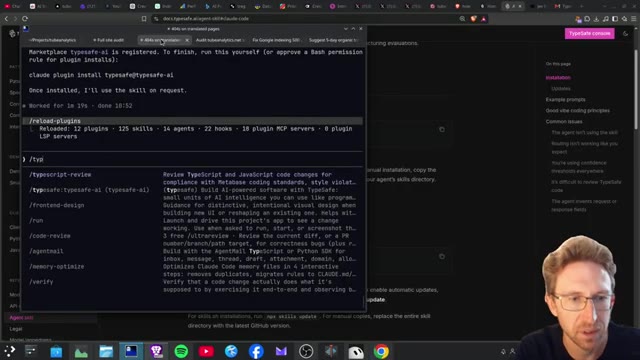
The console gives you a prompt that installs TypeSafe’s agent skill. Paste it into Claude Code, or add TypeSafe’s plugin from the Claude Code plugin marketplace, install it, and reload plugins. In my setup that added two skills: one for building AI-powered software with TypeSafe and one for reviewing TypeSafe code. I did the same in Codex.
The skill teaches your coding agent how to call Jev properly, so you can describe what you want, such as “use Jev to classify these pages”, instead of writing the API calls yourself.
Step 3: Add browser use and the router
TypeSafe also offers two extras I tried:
- Jev browser use: a skill that lets your coding agent drive a Chrome browser with Jev making the step-by-step decisions. My first test failed because the API key wasn’t configured yet, which is the most common setup error.
- Jev router: an npm package that uses Jev to send each turn to the cheapest suitable model. After setting my API key, I started Codex through the router, and it picked a model for each turn and showed me which one.
After a few tests, check the TypeSafe console to confirm the key is actually being used. Mine showed a few thousand tokens across three requests, which cost a tiny fraction of a cent.
A practical example: an SEO and GEO orchestrator
The real test was my own work. I’d already built an SEO orchestrator that runs a set of checks on a page in parallel, and I asked Claude Code, with the TypeSafe skill installed, to keep improving it. Then both orchestrators ran end to end against the live API.
The output was an SEO and GEO audit bundle plus an AI-visibility report. Jev’s top priority was a comparison-citation gap: when I tested comparison-style prompts, ChatGPT and Claude weren’t citing my product. Jev attached a confidence score to that call, and it wasn’t especially high. That’s exactly why the probabilities are useful: they tell you which decisions to double-check.
Where Jev fits in your own workflows
- Classifying pages, leads, tickets or ads into fixed categories.
- Scoring content against a rubric before a human review.
- Yes/no checks in automations, such as whether an email needs a reply.
- Routing work between cheap and expensive models.
If the task needs written output, such as drafting the reply or writing the brief, that’s still a job for an LLM. Jev makes the call, and the LLM does the writing.
Common mistakes to avoid
- Asking Jev to write. It returns structured answers, not prose.
- Ignoring confidence scores. Use them as thresholds, and send low-confidence answers to a person or a bigger model.
- Forgetting the API key. Skills and the router won’t work until the key is set. Check the console for spend to confirm.
- Sending one question per call. Jev reads the state once, so batch related questions into one request.
- Treating launch claims as benchmarks. Test on your own data before you swap out an LLM in production.
Want help building this for your own business?
The video shows what’s possible. Inside AI Income Lab, the paid community from AI Automation Station, you get step-by-step courses, reusable templates, and a place to ask questions while you build. The courses walk you through builds like this one step by step. Over 2,900 members are already building with it, from $29 a month, and you can cancel anytime.
FAQ
Is Jev a replacement for ChatGPT or Claude?
No. Jev is for fast, structured decisions. It doesn’t generate text. Most workflows use both: Jev for the quick calls and an LLM for the reasoning and writing.
Who makes Jev?
TypeSafe AI, founded by Diogo Almeida. The company released Jev on September 15, 2026.
How much does Jev cost?
At the time of writing, $0.042 per million input tokens, with output free. Check TypeSafe’s docs for current pricing.
Can I use Jev from Claude Code and Codex?
Yes. Install TypeSafe’s agent skill in either tool, add your API key, and your coding agent can build with Jev. There’s also a browser use skill and a router package.
Do I need to be on a waitlist?
When I recorded, yes. Access may have changed since, so check TypeSafe’s site.
Conclusion
Jev is worth knowing about if you build agents or automations. It takes the many small decisions off your expensive LLM calls and returns answers with confidence scores you can act on. Start with one decision in a workflow you already run, such as classifying pages or scoring leads, compare Jev’s answers with what you’d decide yourself, and expand from there. Watch the video above to see the setup on screen.
If you’d rather not figure this out alone, AI Automation Station has a paid community for it: AI Income Lab. It’s where the courses, templates and help that go with these builds live, with 2,900+ members, from $29 a month, cancel anytime.

Leave a Reply