Ranking on Google isn’t enough anymore. People now ask ChatGPT, Gemini, Claude and Perplexity for recommendations, so you need to know whether those AI answer engines mention your brand. Crowd Reply is an AI search visibility platform that tracks this, along with citations, keywords and competitors.
In this tutorial I set up Crowd Reply for my SaaS, TubeAnalytics, go through the dashboard and the backlink marketplace, and connect its MCP to Codex so an AI coding agent can turn the data into fixes on my site.
Prefer to watch? See the full walkthrough on YouTube. I go through the dashboard, the marketplace and the MCP setup on screen.
Want the written version? Read the free AI Automation Station guide: CrowdReply MCP with Codex: Citation Data to Review Plans.
What Crowd Reply does
- AI search visibility tracking: how often and where you rank across Gemini, Claude, Perplexity, ChatGPT and Google AI Mode.
- Citation data: which pages AI answers cite as sources.
- Social listening: finds conversations early so your brand gets mentioned before AI models pick them up.
- AI backlinks marketplace: a catalogue of more than 40,000 vetted publishers with authority and traffic data.
- MCP server: pulls all of this into Codex, Claude Code or another AI coding tool.
Pricing
There’s a 7-day free trial. Official pricing on 12 November 2026, from crowdreply.io/pricing, lists Starter at $79 a month, with higher tiers above that. Plans and allowances change, so check the official page before you subscribe.
The dashboard: where you rank in AI answers
After logging in you get an overview of your visibility against competitors. I didn’t have to enter any competitors. It found them automatically.
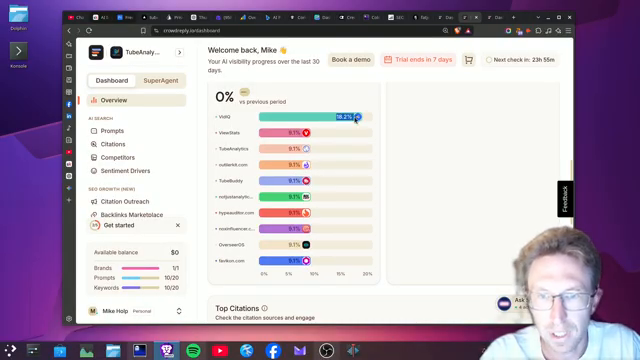
- Visibility: about 18.2% for TubeAnalytics, close to ViewStats, ahead of TubeBuddy, and catching up with vidIQ.
- Mention coverage: mentioned in 4 out of 10 AI answers.
- Google AI Mode: ranked third across the prompts analysed, ahead of ViewStats.
- Top citations: TubeAnalytics was second with 14 citations. Clicking through shows the exact blog articles being cited.
The history graph is empty on day one and fills in over time.
The AI backlinks marketplace
I partly signed up to see the backlink options. You can sort publishers by domain rating and monthly traffic. The top one I saw had 8.4 million monthly organic visits and charged about $589 for a link.
Look at relevance before you buy. Many of the high-traffic sites didn’t suit my niche, and some links, like SourceForge, you can often get for free. An economist.com listing looked like better value: a do-follow link with an author bio, 7–10 day delivery, live for about 36 months, for about $98.
Finding prompts you’re invisible on
The prompts view shows where you’re missing. On one prompt my visibility was 0% while competitors already appeared. These are the most useful gaps to work on.
Competitors and sentiment
On the competitors page my visibility rank was fifth of 11 in one view and third in another. My visibility share was only 25%, compared with 65% for TubeBuddy and 75% for vidIQ, so there’s still a gap. Average sentiment for TubeAnalytics was 100%, compared with 83% for vidIQ and 81% for TubeBuddy.
Keyword tracking
You can track and add keywords. My brand had 10 tracked keywords, all active, with 34 mentions in total.
Connecting the Crowd Reply MCP to Codex
This is the most useful part. Setting it up took one simple prompt: I asked Codex to connect to the Crowd Reply MCP, and it added it. I show this on screen in the video.
- Ask your AI coding tool to add the Crowd Reply MCP and complete authentication.
- Start a new session if the tools don’t show up. I had to open a new Codex tab.
- Choose your model. I used Luna.
- Ask it to pull the Crowd Reply citation data.
It pulled 178 citation records across 15 LLM responses. Then I asked it to create an implementation plan to increase citations.
From data to fixes
I did the same for competitor, keyword and prompt data. Each pull was saved to a report file with priority fixes. Then I told it to implement the fixes, which closed competitor gaps and set up a repeatable citation workflow. Finally, a git commit and push to master deployed the changes to my site on Vercel.
Based on the MCP data, TubeAnalytics ranked second for citations, behind only youtube.com and ahead of vidIQ and TubeBuddy. I put that down mainly to the blog: 555 articles optimised for AI answer engines.
A simple weekly workflow with Crowd Reply
This is the routine I’d use after the first week of data:
- Check the dashboard for changes in visibility, mention coverage and sentiment.
- Open the prompts view and list every prompt where you’re at 0% and a competitor appears.
- Pull citation, competitor and prompt data into your coding agent with the MCP.
- Ask for an implementation plan, review it, then let the agent implement and deploy.
- Recheck the same prompts the following week to see whether the changes worked.
This works best for brands that already have content to optimise, such as SaaS products, blogs and agencies. Without content, there’s little for AI engines to cite.
Common mistakes to avoid
- Buying backlinks on traffic alone. Relevance to your niche matters more than raw traffic.
- Judging trends on day one. History and sentiment get more reliable after a few days of data.
- Leaving the data in the dashboard. The MCP lets an agent turn insights into site changes.
- Forgetting to restart the session. New MCP tools may only appear in a fresh session.
- Ignoring zero-visibility prompts. Those are where competitors are winning answers you could get.
Want help building this for your own business?
The video shows what’s possible. Inside AI Income Lab, the paid community from AI Automation Station, you get step-by-step courses, reusable templates, and a place to ask questions while you build. The courses walk you through builds like this one step by step. Over 2,900 members are already building with it, from $29 a month, and you can cancel anytime.
FAQ
What is Crowd Reply?
An AI search visibility platform that tracks brand mentions, citations, keywords, competitors and sentiment across ChatGPT, Gemini, Claude, Perplexity and Google AI Mode.
How much does Crowd Reply cost?
There’s a 7-day free trial. Official pricing on 12 November 2026, from crowdreply.io/pricing, lists Starter at $79 a month, with higher tiers above that. Plans and allowances change, so check the official page before you subscribe.
Does Crowd Reply have an MCP?
Yes. You can connect it to Codex, Claude Code or another AI coding tool to pull citation, competitor, keyword and prompt data.
Can I buy backlinks through Crowd Reply?
Yes. Its marketplace lists more than 40,000 vetted publishers with domain rating, traffic, prices and delivery times.
Do I need to add competitors manually?
No. In my account it found competitors automatically.
Conclusion
Crowd Reply shows where your brand appears in AI answers, who’s being cited instead, and which prompts you’re missing. Connecting its MCP to an AI coding agent turns that data into an implementation plan and real changes on your site. Start with the free trial, find your zero-visibility prompts, and close the gaps one at a time.
If you’d rather not figure this out alone, AI Automation Station has a paid community for it: AI Income Lab. It’s where the courses, templates and help that go with these builds live, with 2,900+ members, from $29 a month, cancel anytime.

Leave a Reply