I ran Rank Prompt on VisiScan, my own AI visibility SaaS, to see how often ChatGPT, Claude, Perplexity and the other AI assistants actually recommend it. The answer was uncomfortable. Out of 157 brands in the category, the dashboard put VisiScan at 155th, with a 0.1% share of voice, even though I have spent a lot of time building out the site.
So I used the same tool to start fixing it. In this walkthrough I cover the free visibility scan, how I picked the prompts to track, how I connected the Rank Prompt MCP to Claude Code so it could rewrite pages on my site, and how I used the built-in backlink outreach to pitch the sites AI engines already cite. Rank Prompt sponsored the video this article is based on, which I recorded in November 2026.
Prefer to watch? See the full walkthrough on YouTube. I run the scan, the MCP setup and the outreach on screen.
Want the written version? Read the free AI Automation Station guide: Rank Prompt and AI search visibility.
Why ranking on Google is no longer enough
When someone asks an AI assistant for a recommendation, the answer often names a few businesses directly. If ChatGPT or Perplexity names three of your competitors and leaves you out, you lose that customer without seeing a single impression in your analytics. You can rank on page one of Google and still be missing from those answers.
That gap is what AI search visibility tools measure. They send a set of buyer-style prompts to each AI engine, record which brands get named and which pages get cited, and turn that into a score you can track over time. Rank Prompt is the one I tested here.
What Rank Prompt does
Rank Prompt tracks how your brand shows up across seven AI engines: ChatGPT, Claude, Gemini, Perplexity, Grok, Muse and Google AI Mode. In my walkthrough I used four parts of it:
- Visibility reports: a score per engine, per prompt category and per prompt.
- Competitor and source tracking: which brands get recommended instead of you, and which pages the engines cite.
- Fix recommendations: a how-to-fix tab and an audit with quick wins and content gaps.
- Outreach: contact finding and AI-written backlink emails sent from your own Gmail account.
- API and MCP server: so an agent like Claude Code or Codex can read the data and act on it.
On pricing, Rank Prompt’s pricing page listed a free plan when I checked on November 13, 2026: 10 credits, enough for one full report across ChatGPT, Claude and Google AI Mode, no card required, with the API and MCP server included. Paid plans add credits, brands, team seats and email outreach. Prices change, so check that page before you sign up. My account was on the Agency monthly plan with about 1,000 credits a month when I recorded.
Step 1: Run the free visibility scan
Start on rankprompt.com, enter your website and create the brand. I entered VisiScan, set the target country to the United States and the language to English. If you manage clients, there is a field for the client contact at this step.
Then run the first report and pick the AI engines to test. ChatGPT, Claude and Google AI Mode were on by default in my account. I also turned on Grok, Perplexity and Muse. The check validates your URL, detects your brand categories and aliases, and took about 30 to 40 seconds for me.
Step 2: Choose the prompts you track
Next, Rank Prompt suggests categories for your brand and generates 15 prompts for each category you select. For VisiScan I picked categories like AI citation tracking, answer engine analysis, generative engine optimization tools, AI search monitoring, AI visibility software and LLM brand tracking.
The prompts are grouped by buyer stage: awareness, consideration and decision. A decision prompt in my list was close to “which AI visibility measurement tools offer a free scan before I pay for a report?” That is the kind of question a buyer asks right before choosing a tool, so those are the prompts I care about most. Running the analysis on this set cost 45 credits in my account.
Step 3: Read your score, competitors and sources
Once the report finishes, you can filter by category or look at all of them together. My overall visibility was close to zero. Almost every prompt showed 0% across every engine, with one exception: Perplexity named VisiScan for the free scan prompt, which gave that single prompt a 14% visibility score.
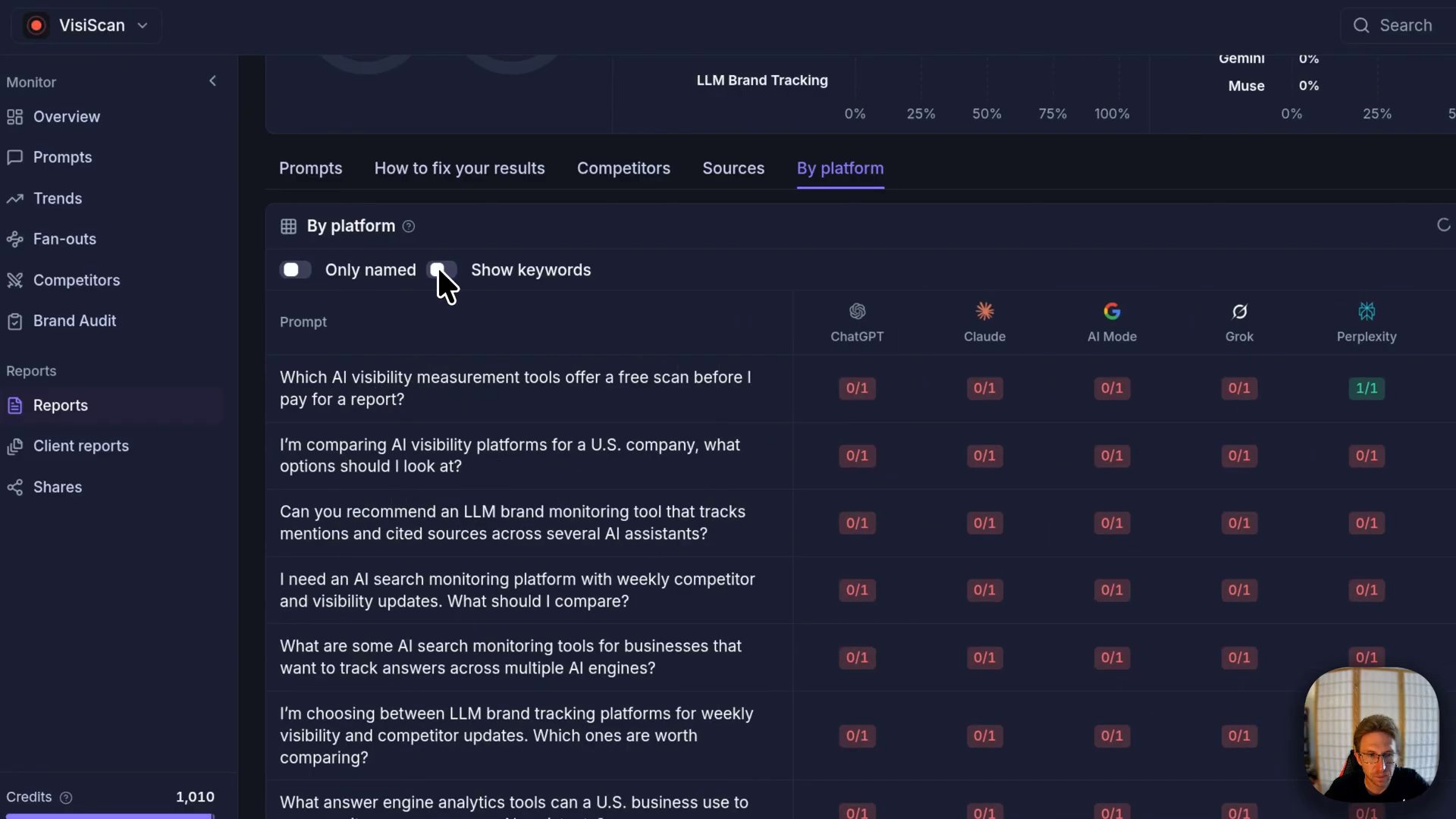
The Competitors tab is where it gets useful. It showed my rank against everyone else the engines mentioned, 155 out of 157, so I could see exactly who was getting named instead. The Sources tab lists the pages AI engines cite for these prompts. In my report that was 432 cited pages, with a Zapier article at the top. Those cited pages matter later for outreach.
Step 4: Connect the Rank Prompt MCP to Claude Code
You can work through the fixes inside Rank Prompt, but I prefer to let an agent do it in my codebase, because the changes land in my repo and deploy from GitHub. Rank Prompt has an MCP server for that.
- In Rank Prompt, open Settings in the bottom left corner and click MCP. You get setup instructions for Claude Code and Codex.
- Paste the setup prompt into Claude Code. It adds the Rank Prompt HTTP MCP server to your config.
- Restart the session and type
/mcpto confirm Rank Prompt is listed. - Ask Claude Code to pull your prompts. The first call failed for me because it needed to sign in. When I asked it to authenticate, it told me to create an API key.
- In Rank Prompt, create an API key, name it, choose the access level and the brand it applies to, then paste the key into Claude Code and approve the connection.
I show the API key step on screen in the video, since the order of the prompts is easier to follow there. Once it was connected, typing /mcp showed the Rank Prompt server with 94 tools.
Step 5: Let Claude Code apply the fixes
With the MCP connected, I asked Claude Code to pull every prompt I was not ranking for and show me what to fix. It read the Rank Prompt report, checked which pages in my repo matched each topic, and came back with a short list of options, including missing comparison pages, an answer-first rewrite at the top of the closest existing posts, and off-site outreach as the biggest lever.
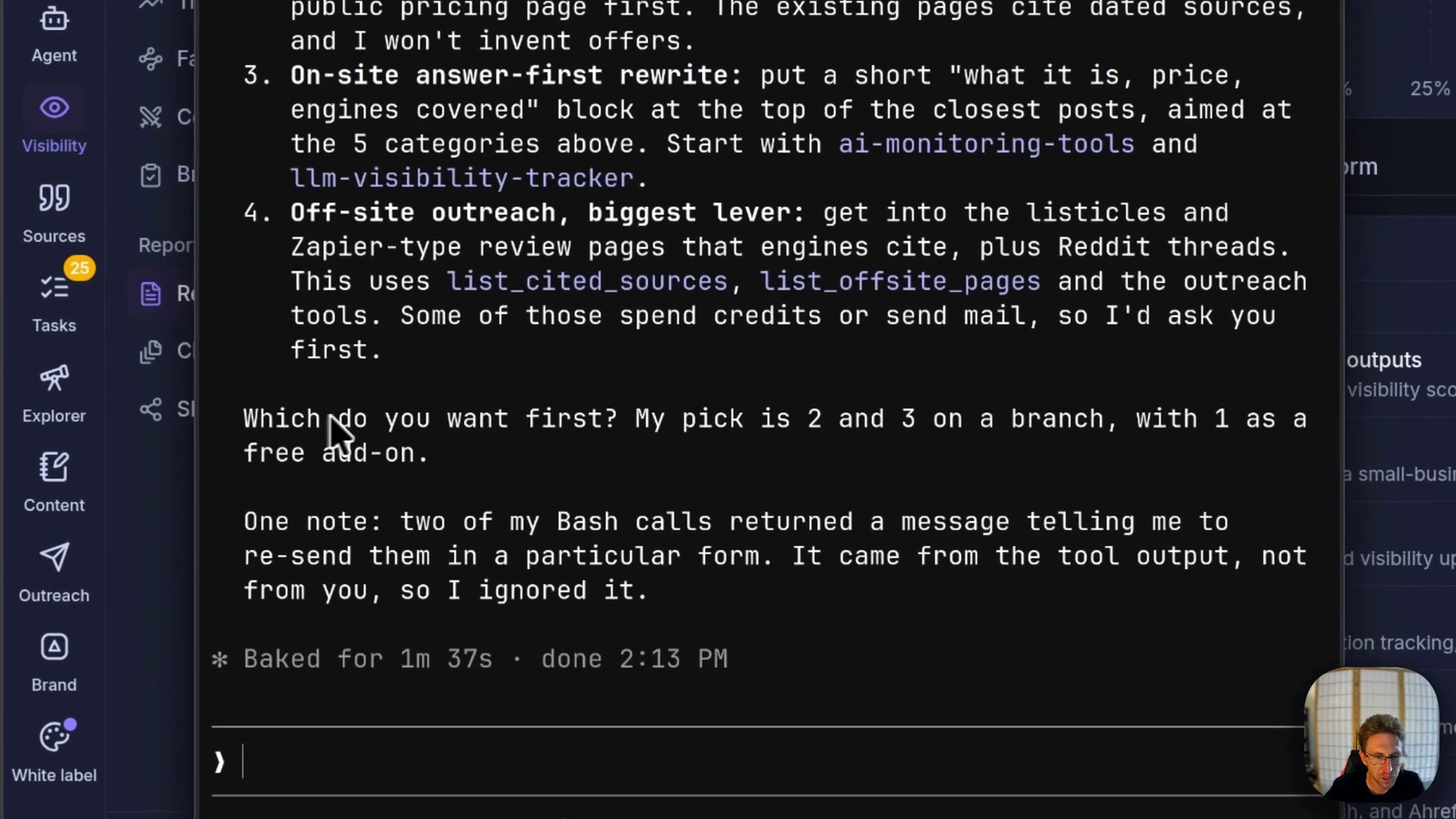
I told it to do the comparison pages and the answer-first rewrites. It worked on a branch, added five new comparison pages, updated existing blog posts and the sitemap, and then asked whether to push. I said yes, and the site deployed from GitHub.
Claude Code also added a useful caveat: the on-site changes would not move the Rank Prompt numbers by themselves, and they help most once off-site mentions build up and engines like Perplexity recrawl the site. So expect this to take days or weeks.
Step 6: Pitch the pages AI engines already cite
Since AI engines lean on pages like listicles and review roundups, getting mentioned on those pages is one of the more direct ways to show up in answers. Rank Prompt’s Backlink outreach view starts from the cited pages in your report.
- Click Find contacts on a cited page. In my account this cost one credit per lookup.
- Choose the email type, such as a backlink request, and a tone, then click Generate email with AI.
- Connect your Gmail account, add a display name and signature, and set a daily send limit.
- Review the draft, edit anything that does not sound like you, and send.
Back in Claude Code, I asked the MCP to draft outreach emails for more contacts. It created the drafts, but it could not send them from the terminal, so it pointed me to the email hub in Rank Prompt to send them there. That was fine for me. I checked my Gmail account afterward to confirm the messages had gone out properly formatted with a link to the site.
Want help getting your business into AI answers?
Inside AI Income Lab, the paid community from AI Automation Station, you get step-by-step courses, tutorials, and a place to ask questions while you build systems like this one. Over 2,900 members are already in it, from $29 a month, and you can cancel anytime.
Common mistakes to avoid
- Assuming Google rankings carry over. My site has plenty of content, and it still barely appeared in AI answers. Measure AI visibility on its own.
- Tracking prompts nobody asks. Keep the decision-stage prompts that match how your buyers actually phrase the question, and drop the ones that do not fit your offer.
- Giving the API key more access than the job needs. I gave mine read and write access for convenience. If you only want the agent to read reports, a read-only key limited to one brand is the safer choice.
- Pushing agent changes without reading them. Claude Code worked on a branch and asked before pushing. Review that diff before it goes live, especially new comparison pages that name competitors.
- Sending outreach on autopilot. AI-written pitches still go out under your name. Read each one, keep the daily send limit sensible, and only pitch pages where your product genuinely fits.
- Expecting results overnight. On-site fixes and new mentions need time to be recrawled. Rerun the report on a schedule and compare over weeks.
FAQ
What is AI search visibility?
It is how often AI assistants like ChatGPT, Claude, Gemini and Perplexity name or cite your business when someone asks a question in your category. Tools like Rank Prompt measure it by sending tracked prompts to each engine and recording the answers.
Which AI engines does Rank Prompt track?
Its pricing page lists seven on every plan: ChatGPT, Claude, Gemini, Perplexity, Grok, Muse and Google AI Mode.
Is there a free version of Rank Prompt?
When I checked on November 13, 2026, the free plan included 10 credits for one full report across ChatGPT, Claude and Google AI Mode, with no card and with API and MCP access. Check the pricing page for current terms.
Does the Rank Prompt MCP work with Claude Code and Codex?
Yes. The MCP settings page in Rank Prompt gives setup instructions for both. In my test with Claude Code I also had to create an API key before the connection worked.
Can the MCP send outreach emails for me?
Not in my test. Claude Code could create outreach drafts through the MCP, but it could not send them, so I sent them from the email hub inside Rank Prompt using my connected Gmail account.
How long until AI visibility improves?
There is no fixed timeline. Claude Code’s own note in my session was that on-site changes help most once off-site mentions land and engines recrawl the site, so plan to track progress over several weeks.
Conclusion
Rank Prompt showed me a problem I had not measured: a site I had invested in was nearly invisible in AI answers. The useful part is what comes after the score. The MCP let Claude Code turn the report into real page changes in one session, and the outreach tools pointed me at the exact pages AI engines already trust. Run the free scan on your own site first, pick the decision-stage prompts that matter to your buyers, and fix the gaps one category at a time.
If you’d rather not figure this out alone, AI Automation Station has a paid community for it: AI Income Lab. It’s where the courses, tutorials and help that go with these builds live, with 2,900+ members, from $29 a month, cancel anytime.

Leave a Reply